
I’d love to find out what Porsche is charging for that wireless car charger.
I’d love to find out what Porsche is charging for that wireless car charger.
I wrote recently about purchasing a M4 Pro Mac mini for my family. Our next computer purchase is very likely to be a new laptop for me. I suspect that Apple will not build my ideal MacBook, but I thought it’d be fun to layout my constraints, and what I’d like in a new MacBook.
I currently have two Macs:
( 1 ) The base M1 Pro MacBook Pro with a binned GPU, 512 GB of storage, and 16 GBs of RAM
( 2 ) a M4 Pro Mac mini with 2 TB of storage and 64 GB of RAM
The MacBook Pro is largely used on the couch or in bed for some writing, reading, and social media. The M1 Pro is plenty fast for 95% of my use cases, however I am a little RAM staved on this device. In contrast, the Mac mini has been used for photo editing, and when I need additional monitors. A future MacBook for me needs to slot in nicely between those two: a clear upgrade over my M1 Pro, but not so performant that it eclipses the Mac mini.
I think it’s very likely that my next MacBook will be a MacBook Air. This will be a first for me. My first Mac was the 2008 Black-Mac when I went off to college, and ever since then I’ve had MacBook Pros. I needed that horsepower in graduate school, but I just don’t need it in a laptop today, especially when I have the Mac mini at my desk. I can afford the luxury of a thin and light laptop, without the penalty of poor and slow performance.
This means I need to consider what things I’d lose in a MacBook Air relative to my MacBook Pro, and if I’m willing to part with those. In my mind, the MacBook Pros have three large advantages over the MacBook Air line: ( 1 ) the ports ( 2 ) the SoC and ( 3 ) the display.
Ports
The current MacBook Air has two Thunderbolt 4 ports and a MagSafe port for charging, meaning I’d lose the SD card reader of my current laptop, and the HDMI port. Thats fine. I have used those ports maybe less than a dozen times total.
Truthfully, the biggest thing I’ll miss are Thunderbolt ports on either side. Having the ability to change my laptop from either the left or right side has been great. I’ll miss that.
SoC
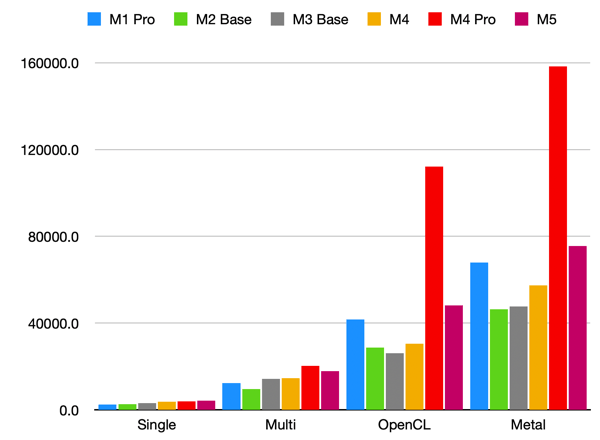
According to GeekBench scores, the last-generation M4 MacBooks had reached parity with my M1 Pro, and the M5 has now surpassed the M1 Pro in both Single-Core, Multi-Core, and GPU performance. The most CPU/GPU intensive thing I do is some light photo editing, and even then I’m limited by 16GB of RAM on my MacBook Pro. Any M#-no-adjective laptop I buy from here on out will be an upgrade for me. Excellent.
On the other hand, this presents a timeline in the other direction: if M-series chips continue to progress at this rate, roughly four generations beyond the M4 Pro, the M#-no-adjective line will surpass its performance. Now, that might be okay for my purposes. I’m very unlikely to get a 64 GB of RAM on a laptop, but it does suggest that I should target the M7, M8, or M9 generation.
Display
Below is Apple’s summary of the displays on the current 13-inch MacBook Air versus my 14-inch MacBook Pro.
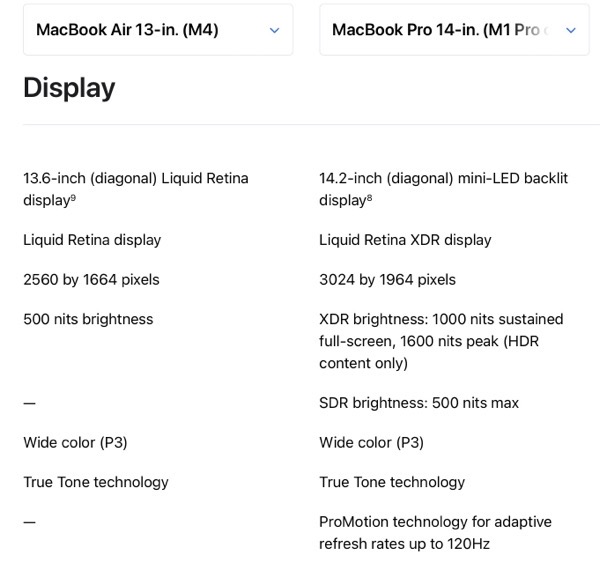
The size change I’m perfectly fine with, I think going slightly smaller (in all dimensions) and losing some weight would be nice. However, the HDR, and ProMotion are features I do not want to lose. I think theres two reasons to be hopeful in this regard:
( 1 ) The recently-released iPhone 17 is the first base-iPhone to have a ProMotion Screen, and the new iPhone Air has it as well. That is, Apple clearly doesn’t see 120 Hz refresh rates as a “Pro” feature any longer.
( 2 ) The current round of rumors regarding Mac laptops are that the M6 MacBook Pros are likely to get an OLED display in late 2026 or 2027. That allows Apple to move the existing displays on the MacBook Pros down to the Air line, and still have some product differentiation against the Pro line.
Let’s hope this pans out, and the MacBook Airs get a significant display upgrade somewhere around the M7 release.
Colors
I would really love to see Apple bring the colors from the existing iMac line-up to the air. Just, please, keep the existing black bezel and keyboard of the existing Air. BasicAppleGuy mocked up some examples for April Fool’s day last year. They look fun! Imagine that – a fun computer.
Cellular
I’ve had a cellular antenna in my iPad since 2020, and I love it when I’m traveling. I’ve been using my iPad less and less over the last year or so, and I expect that to continue. I would really love this feature to just hop over to the MacBook line-up. The one feature Apple would need to build into macOS is something like TripMode, which I’ve written about before. Similar features have been baked-in to iPhones and iPads since day one – how hard could it be?
Nano-Texture Glass
Apple recently started including Nano-Texture glass for an anti-reflective matte finish on the MacBook Pro line. I’d love this on a future MacBook Air as well.
My Ideal MacBook
As I said from the outset, I think a lot of this is unlikely to happen. However, I think it’s very likely that Apple releases an M8 with performance somewhere between the M1 Pro and the M4 Pro, and thats probably going to be how I identify the right time to upgrade my laptop. Although, the rumor mill will likely guide whether or not I pull the trigger. I’d hate to upgrade only for a cellular or a better display to get released in the year or two after I’ve made the purchase.
One final unlikely thought: what if the aforementioned MacBook Pro upgrade to OLED display also includes a considerable slimming-down of the device as well? That might be tempting.
I don’t think I can overestimate how influential Green Day and Mike Dirnt have been on me. I recall drooling over his Gibson Grabber when I was a teenager. Please, someone, talk me out of buying this.
David Pierce writing at The Verge:
I’ve been using the latest Pro as my go-to laptop for a few weeks now, just to see what all this change adds up to, and I’m shocked at how close this thing is to a truly all-purpose computer. There are the obvious things, like built-in cellular connectivity and the Apple Pencil, that give the Pro powers the Mac doesn’t have. The mix of touch and trackpad is genuinely great, too; I’m constantly back and forth to the screen, scrolling or swiping with the trackpad but doing finer and more complex things with my hands. And there’s just no replacing the fact that you can turn on a movie, pick up the screen, and flop back on the couch. Add in the solid speakers, good camera, and great battery life, and there’s a lot I like about life with the iPad. If you do creative work of any kind — and more and more people do — it’s a uniquely useful device.
Which makes it all the more annoying every time you run into some totally unnecessary system limitation. There are still a lot of those. Apple’s laptops are allowed to run any app, not just the ones in the App Store. They can interact with more accessories. They can access virtually everything about the system through the Terminal. They can run better browsers. Utility apps I rely on to make my computing life easier, like Raycast and Better Touch Tool, just don’t exist the same way on the iPad. There’s almost nothing the Mac straight-up won’t let you do, but the iPad is full of limitations. They’ve been there for so long, and are so glaring, that we’ve been mad about them in reviews since at least 2018. Apple saw them as a feature, not a bug.
Even with iPadOS 26, I still find multitasking with the iPad hugely cumbersome, and I just think to myself “ugh, I should just grab my Mac.” I have a iPad Air with the A14 SoC, the last iPad Air before the transition to M-series chips. 5+ years later, it’s fine. It does the multi-tasking things in iPad OS 26. However, in the last 6 months, I’ve found myself reliably just using my M1 Pro MacBook Pro. Perhaps it’s for the larger real estate; perhaps it’s that the M1 Pro has held up better than the A14 over time. In any case, the I just consistently feel that I’m hitting walls on that iPad.
Great interview from Reverb with Jade from AFI. Really fascinating for him to describe how he has thought about filling space with his guitar as the lone guitarist in the band. It really reminds me of similar comments from Mark Hoppus from blink-182 and his playing power chords on his bass.
As a resident and regular biker of and within Portland, I am a regular reader of BikePortland. Jonathan recently published this piece regarding Oregons restrictions on minors using e-bikes. Oregon, and likely the country, needs to make some common-sense guidelines for this sort of micro-transit. Regulating bikes by class, setting laws, and holding parents responsible is likely the best way forward.
iOS 26.1 added in a “Swipe to Stop” gesture for alarms, reminiscent of the “Slide to Unlock” Apple used up until the iOS 7 redesign. I think this is a great idea, but I wish they made the snooze the one that needs the slide. This makes it *much* easier to just keep on snoozing.
Gruber dutifully notes that this can be disabled in settings.
Stephen Hackett, writing at 512 Pixels, with a wonderful retort to the conventional wisdom that the M5 Macs released last week were “boring”. Good! The Mac regularly getting attention and regularly building ~10-15% improvements year over year means that any time you need to upgrade a Mac (whether by choice or not), you’re going to get something better than you last had.
Unsaid in his post is how impressive this collaboration between Apple and TMSC is. It’s not *just* Apple that are squeezing regular YoY upgrades. TMSC is similarly executing.
Theres something very appealing about van lifers. Perhaps it’s how well organized everything is? Or how aware folks become of their energy use? This video from The Verge is a great overview of one of their reviewers vans.
Another item shared by Jason Kottke in the last few weeks: Royal Family. A fun logic game wherein you must place chess pieces so ( a ) they cannot attack one another while ( b ) you’re restricted to placing a single piece per zone.

