Six Color’s Apple Report Card 2025

Jason Snell released the results from his annual survey of the Apple blogosphere community at Six Colors. I thought it’d be fun to join in the fray and add some of my thoughts, because I’m pretty different from most of those surveyed. For one, my income isn’t at all related to Apple (at work I am required to use a terrible Windows laptop and terrible Microsoft services), and so I really only use these devices in my personal capacity and consequentially really remain on the “happy path” of Apple devices and services.


Mac: 4/5

I’m more on the fence about Tahoe compared to most of the respondents. It’s a totally stable OS, I do mostly like how it looks; it’s just a little thoughtless in places and needs to get buttoned up. I regularly use Stage Manager on my laptop, and I think it’s great. In general, the software is good-not-great at the moment, but it is good at the end of the day.

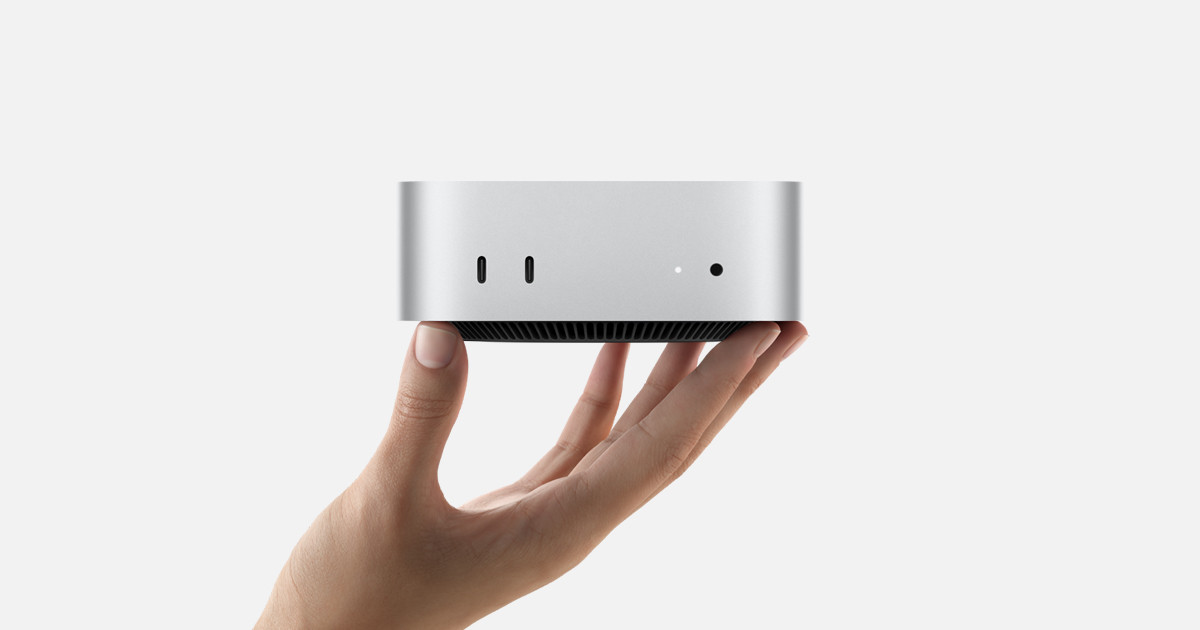
In contrast, Mac hardware is stellar. I bought a Mac Mini this year, and I love it. Its so wonderful having that little guy always ready-to-go on my desk, and regularly running back-ups for me overnight.


iPhone: 5/5

The iPhone 17 and iPhone 17 Pro this year is the strongest line-up in ages. The iPhone 17 brought a ton of features down to the primary iPhone line this year, like ProMotion screens. If you’re an update-every-few-years sort of person, this year is the right year to update. The iPhone 17 Pro’s camera is awesome, and the huge plateau is nice to look at. Its great to see more of that wonderful orange sneaking out from my case every day.

I am not nearly as enamored with the iPhone Air compared to many folks, mostly because the camera is such a critical component of the phone for me. It exists. Its fine.


iPad: 3/5

I water damaged my third-gen iPad Air over the holidays, and upgraded to a refurbished M1 iPad Air in January. It’s notably faster. My spouse has an M4 iPad Pro. Its super quick.

Even with iPadOS 26, iPadOS still pales in comparison to Mac OS. I think the implementation of the stoplight buttons is just straight-up bad, and everyone being so excited about them is akin to a cold glass of water in hell. Yes, its a huge step forward for the platform, no doubt. But again, the Mac is just so wildly superior.

Still, the iPad is the best tablet on the planet, hands-down. Theres essentially no competition. Theres a few categories like this now, including wearable. Apple just seems to be resting on their laurels a bit, because there is effectively zero competitive pressure from Google or anyone else.


Wearables: 3/5

This whole category is buoyed by AirPods Pro 3. They’re great. AirPods Max need some serious love, and are just not taken seriously by the market.


Watch: 2/5

I love my Apple Watch Series 9, but has Apple added anything to the last two version to make me upgrade? I usually update on a 3-year cadence, but if Series 12 is as lackluster as 10 or 11, I may not.

The Ultra 3 was a *fine* update, but truly hasn’t added anything compelling since the first Ultra was introduced three years ago. If anything the Series 10/11’s larger screen makes me wonder where Apple wants to take this product.


Vision Pro: 1/5

I look at these periodically on eBay, but am consistent dissuaded by how often people with them say they use them.


Home: 2/5

The Home app remains usable, but where is the rumored HomePod w/ a touchscreen?


Apple TV: 3/5

sigh… Apple TV remains the best TV interface on the market, but similar to the iPad and Apple Water, a lack of serious competition has lead Apple to complacency.

The service, however, is firing on all cylinders.


Services: 3/5

Apple News is my primary app for reading the news, and it’s good-to-decent. It would be good if they eliminated low-quality stories, and cleaned up the ads in the articles.

Apple Fitness is good, but I do wish they’d make some generic exercises and you could just listen to your own music, rather than their playlists.

Apple Arcade is nice-to-have, especially when traveling.

Apple Music is great. No complaints.


Hardware Reliability: 4/5

Apple OS Quality: 4/5

Apple App Quality: 3/5

Developer Relations: No Opinion

World Impact: 1/5

You know.

Predictions for Apple’s Forthcoming Low-Cost MacBook and Other Announcements

On Monday, Apple is set to begin a string of product announcements culminating in their “Apple Experiences” with press events simultaneously all over the world on Wednesday. Of those announcements, Apple is widely expected to announce a new low-cost MacBook powered by the iPhone 16 Pro’s A18 Pro chip, and will presumably resurrect the “MacBook-no-second-word” brand. Oh, and it’s widely expected to come in Good Colors 🤩.

Theres a lot of speculation regarding how configurable this product will be with respect to chip-binning, RAM, and storage. I don’t think this computer will be any more configurable than the iPhone 16 Pro was: storage options starting at 128 GB and up to 1 TB. I just don’t think Apple can afford to hit a low price, and go about making new configurations of that A18 Pro SoC. That also means it’ll only have a measly 8 GB of RAM, the minimum needed to support Apple Intelligence. This machine may be small and fun, but it may not be a good Mac.

Otherwise, the announcements are expected to be rather milquetoast. Chip-bumps for most products getting an update. There are some on-going rumors that the M5 Pro and Max will have some new-to-Apple 2.5D packaging updates to further separate CPU and GPU thermals and gain performance. This may be interesting considering the gains Apple Silicon had by allowing CPU and GPU to pull from a single pool of RAM. Does one or the other of them slow if the CPU and GPU are no longer on the same die?

Lastly, on a personal note, I am *really* hoping for a new Apple TV. There doesn’t seem to be much enthusiasm for this product, but I have an original Apple TV 4K model that is feeling awfully old now, and I just sent the remote through the wash and killed it. It could use an upgrade, and I think my only chance its updated this week is if it is *such* a small upgrade that its flown under the radar of all the usual leaks in the supply chain.

My MacBook Wishlist

I wrote recently about purchasing a M4 Pro Mac mini for my family. Our next computer purchase is very likely to be a new laptop for me. I suspect that Apple will not build my ideal MacBook, but I thought it’d be fun to layout my constraints, and what I’d like in a new MacBook.

I currently have two Macs:

( 1 ) The base M1 Pro MacBook Pro with a binned GPU, 512 GB of storage, and 16 GBs of RAM

( 2 ) a M4 Pro Mac mini with 2 TB of storage and 64 GB of RAM

The MacBook Pro is largely used on the couch or in bed for some writing, reading, and social media. The M1 Pro is plenty fast for 95% of my use cases, however I am a little RAM staved on this device. In contrast, the Mac mini has been used for photo editing, and when I need additional monitors. A future MacBook for me needs to slot in nicely between those two: a clear upgrade over my M1 Pro, but not so performant that it eclipses the Mac mini.

I think it’s very likely that my next MacBook will be a MacBook Air. This will be a first for me. My first Mac was the 2008 Black-Mac when I went off to college, and ever since then I’ve had MacBook Pros. I needed that horsepower in graduate school, but I just don’t need it in a laptop today, especially when I have the Mac mini at my desk. I can afford the luxury of a thin and light laptop, without the penalty of poor and slow performance.

This means I need to consider what things I’d lose in a MacBook Air relative to my MacBook Pro, and if I’m willing to part with those. In my mind, the MacBook Pros have three large advantages over the MacBook Air line: ( 1 ) the ports ( 2 ) the SoC and ( 3 ) the display. 

Ports

The current MacBook Air has two Thunderbolt 4 ports and a MagSafe port for charging, meaning I’d lose the SD card reader of my current laptop, and the HDMI port. Thats fine. I have used those ports maybe less than a dozen times total.

Truthfully, the biggest thing I’ll miss are Thunderbolt ports on either side. Having the ability to change my laptop from either the left or right side has been great. I’ll miss that.

SoC
CleanShot 2025-11-11 at 15.29.30.

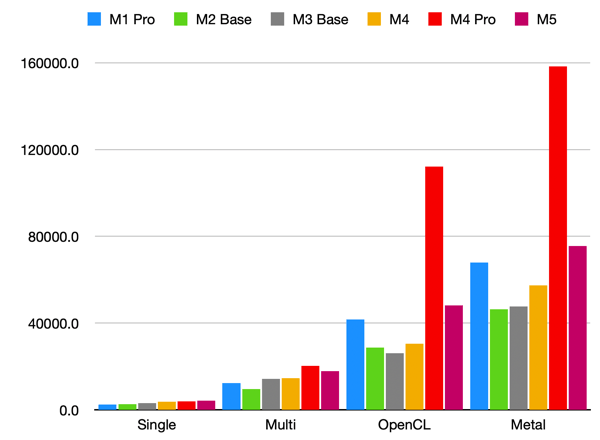
According to GeekBench scores, the last-generation M4 MacBooks had reached parity with my M1 Pro, and the M5 has now surpassed the M1 Pro in both Single-Core, Multi-Core, and GPU performance. The most CPU/GPU intensive thing I do is some light photo editing, and even then I’m limited by 16GB of RAM on my MacBook Pro. Any M#-no-adjective laptop I buy from here on out will be an upgrade for me. Excellent.

On the other hand, this presents a timeline in the other direction: if M-series chips continue to progress at this rate, roughly four generations beyond the M4 Pro, the M#-no-adjective line will surpass its performance. Now, that might be okay for my purposes. I’m very unlikely to get a 64 GB of RAM on a laptop, but it does suggest that I should target the M7, M8, or M9 generation.

Display

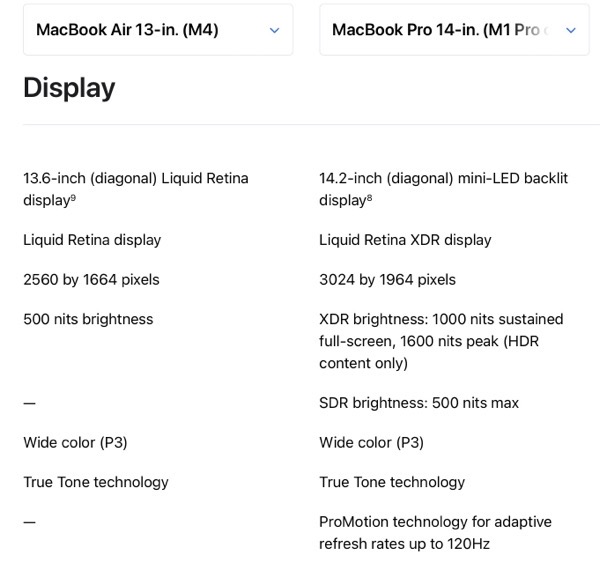
Below is Apple’s summary of the displays on the current 13-inch MacBook Air versus my 14-inch MacBook Pro. 
CleanShot 2025-11-11 at 12.08.01@2x.

The size change I’m perfectly fine with, I think going slightly smaller (in all dimensions) and losing some weight would be nice. However, the HDR, and ProMotion are features I do not want to lose. I think theres two reasons to be hopeful in this regard:

( 1 ) The recently-released iPhone 17 is the first base-iPhone to have a ProMotion Screen, and the new iPhone Air has it as well. That is, Apple clearly doesn’t see 120 Hz refresh rates as a “Pro” feature any longer.

( 2 ) The current round of rumors regarding Mac laptops are that the M6 MacBook Pros are likely to get an OLED display in late 2026 or 2027. That allows Apple to move the existing displays on the MacBook Pros down to the Air line, and still have some product differentiation against the Pro line.

Let’s hope this pans out, and the MacBook Airs get a significant display upgrade somewhere around the M7 release.

Colors

I would really love to see Apple bring the colors from the existing iMac line-up to the air. Just, please, keep the existing black bezel and keyboard of the existing Air. BasicAppleGuy mocked up some examples for April Fool’s day last year. They look fun! Imagine that – a fun computer.

Cellular

I’ve had a cellular antenna in my iPad since 2020, and I love  it when I’m traveling. I’ve been using my iPad less and less over the last year or so, and I expect that to continue. I would really love this feature to just hop over to the MacBook line-up. The one feature Apple would need to build into macOS is something like TripMode, which I’ve written about before. Similar features have been baked-in to iPhones and iPads since day one – how hard could it be?

Nano-Texture Glass

Apple recently started including Nano-Texture glass for an anti-reflective matte finish on the MacBook Pro line. I’d love this on a future MacBook Air as well.

My Ideal MacBook

As I said from the outset, I think a lot of this is unlikely to happen. However, I think it’s very likely that Apple releases an M8 with performance somewhere between the M1 Pro and the M4 Pro, and thats probably going to be how I identify the right time to upgrade my laptop. Although, the rumor mill will likely guide whether or not I pull the trigger. I’d hate to upgrade only for a cellular or a better display to get released in the year or two after I’ve made the purchase. 

One final unlikely thought: what if the aforementioned MacBook Pro upgrade to OLED display also includes a considerable slimming-down of the device as well? That might be tempting.

Boring Is What We Wanted – 512 Pixels

Stephen Hackett, writing at 512 Pixels, with a wonderful retort to the conventional wisdom that the M5 Macs released last week were “boring”. Good! The Mac regularly getting attention and regularly building ~10-15% improvements year over year means that any time you need to upgrade a Mac (whether by choice or not), you’re going to get something better than you last had.

Unsaid in his post is how impressive this collaboration between Apple and TMSC is. It’s not *just* Apple that are squeezing regular YoY upgrades. TMSC is similarly executing.

My New-To-Me Mac Mini

Buy Mac mini - Apple

I had been kicking around the idea of a “Family” Mac for a few reasons:

( 1 ) I’ve wanted some central Mac that could house my entire photo library and back it up to my NAS

( 2 ) A family member has a Windows laptop is that is nearly dead, and is Mac-curious. There is a high likelihood that I will be the tech support for their new laptop, so I have a vested interested in ensuring they move to a Mac

(3) My wife really loves her M4 iPad Pro, so much so that she hardly uses her MacBook anymore. She does need a Mac from time to time, but it is very infrequent.

This provided an interesting opportunity: give my wife’s MacBook Pro to the Mac-curious family member, and buy us a Mac mini for the family. This way, I could set up my wife’s iPad to access the Mac mini, so that she would have access to a Mac when she needs it. I would also have a desktop Mac I could use when at my desk, or for any automations, and still have my M1 Pro MacBook Pro for while I’m around the house or on the go.

The introductory model for the Mac mini has 256 GB storage, 16 GB RAM, and an M4, and while it’s a bargain for its $599 price, it is insufficient for my needs:

( 1 ) I wanted a new Mac that was clearly an upgrade relative to my existing M1 pro MacBook Pro (otherwise, why would I use it?)

( 2 ) I needed enough internal storage to house all my data and photos.

( 3 ) I wanted enough RAM that I wouldn’t ever push the device into using swap memory.

Processor

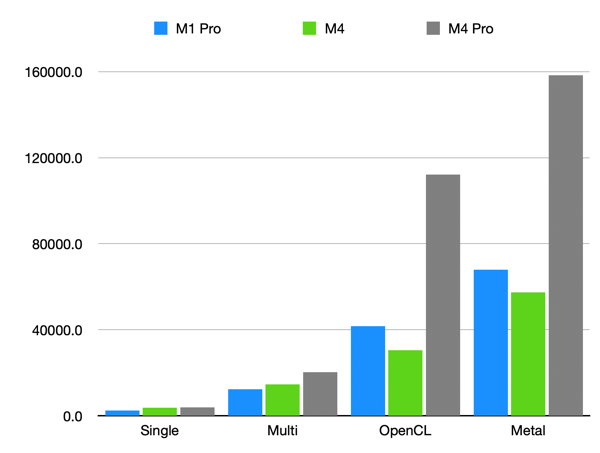
The Mac mini can be configured with either an M4 or an M4 Pro chip. To decide between the two, I compared GeekBench 6 scores back to my M1 Pro MacBook Pro:

CleanShot 2025-11-11 at 14.30.21.

M4 Pro it would be.

Storage:

I have about 1.1 TB of data in iCloud between my documents, back-ups, and photos. Upgrading to a 2 TB internal drive was a no-brainer, especially when the price gap between 2 TB and 4 TB is an additional $600.

RAM:

This is where I splurged. I was, and am, tired of being RAM limited on my laptop. I usually only hit a clear slow-down when I’m editing photos on my MacBook Pro, but I regularly see it using swap. With an M4 Pro, you have choices between 24, 48, and 64 GBs of RAM. I wanted to at least double the RAM on my laptop, but ideally this machine will last us 5+ years and not start moving to swap memory. 64 GB – no regrets.

Accessories:

I wanted a new monitor to go with the new desktop. At work, I have three monitors: one positioned centrally in landscape, flanked by two portrait monitors on either side. I already had two 27” HP Z27n monitors, and woot.com had a great sale on a Samsung M80 32” monitor. I’ve just re-created my set-up at work at home. This monitor technically falls into “The Bad Zone” for Mac monitors, but it’s fine.

Lastly, I set up Screens Connect and bought a subscription to Screens 5 for the family. This way both my wife and I can access the Mac mini remotely from our preferred devices.

I did hunt for a refurbished model on Apples site for the better part of a month, and I bought the configuration described above: M4 Pro, 2 TB SSD, 64 GB of RAM. The thing is so fast. I’ve seldom seen my memory usage above 20% so far, with the lone exception being when I selected every application in my application folder and hit enter.

One Foot Tsunami: Tahoe’s Terrible Icons

Paul Kafasis has a nice run down of some of the worst icons in macOS Tahoe.

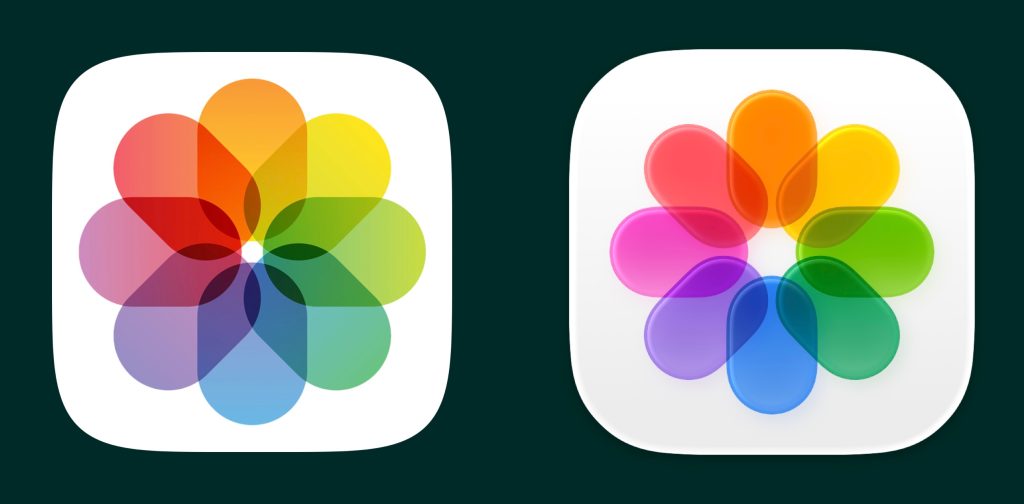
For my money, the single worst change is the photos app icon, shared across the OSs. The old icon did a great job of using transparency to mix the colors. The ovals are nice and sharp with high contrast to the white background. I constantly think something hasn’t loaded correctly with the new icon. The roundedness and specular highlights around the edges of the ovals lose the contrast with the background and suddenly the whole thing feels blurry.


RIP LaunchPad

I know LaunchPad has been the bud of many jokes ever since it was introduced in OSX 10.7 Lion, but I have been an avid user for years, meticulously organizing the pages and pages of apps. LaunchPad is gone in macOS Tahoe, which releases today. Clearly, Apple was trying to make the Mac more accessible to its larger, and growing (at the time) iPhone user base. Evidently, it never quite caught on. I found it to just be easy to use. Sometimes I use my Mac one-handed with a trackpad in my lap, and I could four finger pinch to access any app I want to launch.  In the end, I had two pages: my most-used applications for personal use, and those for more professional use.