iOS 26.1 added in a “Swipe to Stop” gesture for alarms, reminiscent of the “Slide to Unlock” Apple used up until the iOS 7 redesign. I think this is a great idea, but I wish they made the snooze the one that needs the slide. This makes it *much* easier to just keep on snoozing.
Gruber dutifully notes that this can be disabled in settings.
Paul Kafasis has a nice run down of some of the worst icons in macOS Tahoe.
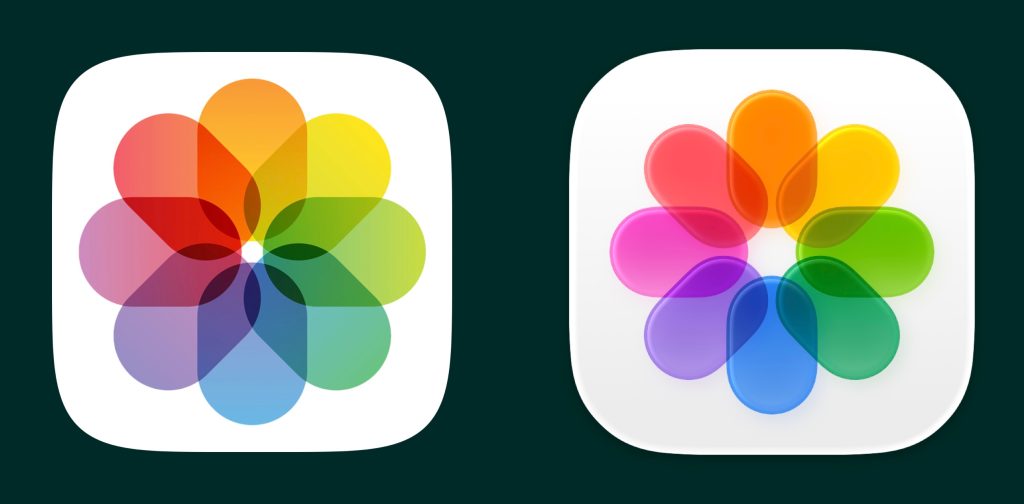
For my money, the single worst change is the photos app icon, shared across the OSs. The old icon did a great job of using transparency to mix the colors. The ovals are nice and sharp with high contrast to the white background. I constantly think something hasn’t loaded correctly with the new icon. The roundedness and specular highlights around the edges of the ovals lose the contrast with the background and suddenly the whole thing feels blurry.
I’ve been considering writing something regarding how changes to Control Center in iOS 11 have introduced some weird UI decisions. David Spark’s recent post regarding his changes in the iPad homescreen inspired me, particularly because of his suggestion to add Spotlight to the multi-tasking screen. (For what its worth, Apple should add the short swipe from the top for Spotlight in iOS 10 back to iOS 11.)
In general, I like Control Center in iOS 11, although I didn’t have the issues some people had with the iOS 10 Control Center (typically centered around the multiple pages). More than anything, I’m just happy Apple seems to be settling into something. The last several years have each seen a big change to Control Center, and this one seems like its built for the long haul. Its easy to imagine Apple openning this up to developers in iOS 12.
However, lets compare the differences in Control Center between a 3D Touch enabled iOS device, like an iPhone, and a non–3D Touch device, like an iPad, using the “Now Playing” controller. On both devices, the controls are too small as touch targets. If I had a nickle for every time I skipped ahead 60s while listening to a podcast in Overcast when I meant to pause it, I’d have several nickles. As a result, I find myself going into the controller more often than not, and this is where seams between the two devices begin to show. On an both iPhones and iPad, you can’t simply tap on the top half of the controller to enter it. Instead, you can long press. This is a bad UI decision and it makes me feel like I’m swimming through molassas. Luckily on iPhones, you can get through this a bit faster by 3D Touching the controller to enter it. Apple should change this so that a short tap on the top of the controller gets you into it. This is a no-brainer, especially on non–3D Touch enabled devices.
I would also be remiss if I forgot to menion that David Spark’s book Markdown is also what I’m reading as I’m starting this blog.

 At Ken