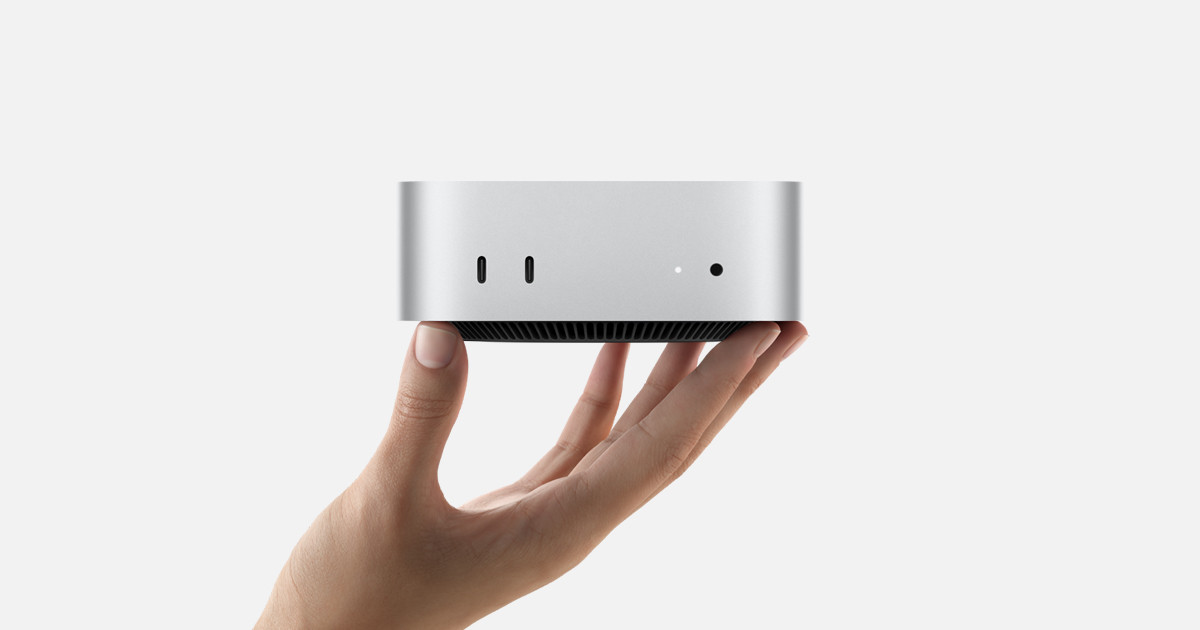
I had been kicking around the idea of a “Family” Mac for a few reasons:
( 1 ) I’ve wanted some central Mac that could house my entire photo library and back it up to my NAS
( 2 ) A family member has a Windows laptop is that is nearly dead, and is Mac-curious. There is a high likelihood that I will be the tech support for their new laptop, so I have a vested interested in ensuring they move to a Mac
(3) My wife really loves her M4 iPad Pro, so much so that she hardly uses her MacBook anymore. She does need a Mac from time to time, but it is very infrequent.
This provided an interesting opportunity: give my wife’s MacBook Pro to the Mac-curious family member, and buy us a Mac mini for the family. This way, I could set up my wife’s iPad to access the Mac mini, so that she would have access to a Mac when she needs it. I would also have a desktop Mac I could use when at my desk, or for any automations, and still have my M1 Pro MacBook Pro for while I’m around the house or on the go.
The introductory model for the Mac mini has 256 GB storage, 16 GB RAM, and an M4, and while it’s a bargain for its $599 price, it is insufficient for my needs:
( 1 ) I wanted a new Mac that was clearly an upgrade relative to my existing M1 pro MacBook Pro (otherwise, why would I use it?)
( 2 ) I needed enough internal storage to house all my data and photos.
( 3 ) I wanted enough RAM that I wouldn’t ever push the device into using swap memory.
Processor
The Mac mini can be configured with either an M4 or an M4 Pro chip. To decide between the two, I compared GeekBench 6 scores back to my M1 Pro MacBook Pro:
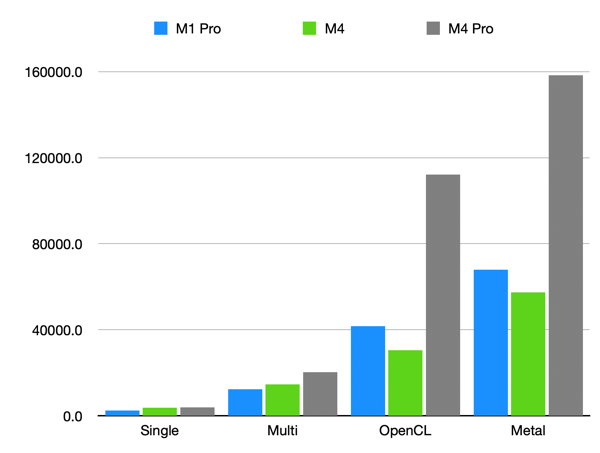
M4 Pro it would be.
Storage:
I have about 1.1 TB of data in iCloud between my documents, back-ups, and photos. Upgrading to a 2 TB internal drive was a no-brainer, especially when the price gap between 2 TB and 4 TB is an additional $600.
RAM:
This is where I splurged. I was, and am, tired of being RAM limited on my laptop. I usually only hit a clear slow-down when I’m editing photos on my MacBook Pro, but I regularly see it using swap. With an M4 Pro, you have choices between 24, 48, and 64 GBs of RAM. I wanted to at least double the RAM on my laptop, but ideally this machine will last us 5+ years and not start moving to swap memory. 64 GB – no regrets.
Accessories:
I wanted a new monitor to go with the new desktop. At work, I have three monitors: one positioned centrally in landscape, flanked by two portrait monitors on either side. I already had two 27” HP Z27n monitors, and woot.com had a great sale on a Samsung M80 32” monitor. I’ve just re-created my set-up at work at home. This monitor technically falls into “The Bad Zone” for Mac monitors, but it’s fine.
Lastly, I set up Screens Connect and bought a subscription to Screens 5 for the family. This way both my wife and I can access the Mac mini remotely from our preferred devices.
I did hunt for a refurbished model on Apples site for the better part of a month, and I bought the configuration described above: M4 Pro, 2 TB SSD, 64 GB of RAM. The thing is so fast. I’ve seldom seen my memory usage above 20% so far, with the lone exception being when I selected every application in my application folder and hit enter.
 At Ken